Showing posts with label Computer. Show all posts

Monday, December 9, 2013

How To Know Anything Or Finding Driver Not Installed On The Computer

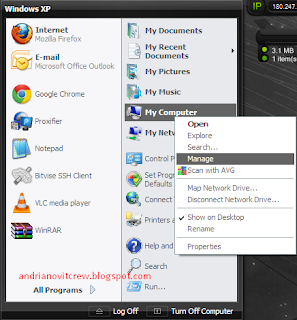
1. Click the Windows Start Menu
2. Choose my computer, Right Click Select manage, Later will come the popup computer management
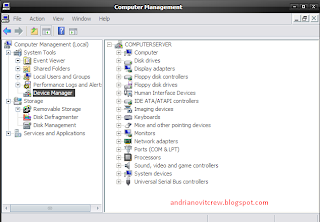
3. Select the device manager, see section on the right, if there is one part that there is a yellow question mark .. it means the driver is not installed.

For more details please see the screenshot that I have made below:


Example Computer That Not Complete Install drivers


Examples of Complete Computers That Already Installed drivers


Wednesday, November 27, 2013

How to Find out Hidden Email ID (Facebook) of your Friends

Find out Hidden Email ID of your Friends

Email id is needed when we want to create Facebook Id  but we hide this email for various reason.So when we want to see my friends email id most of the time we are unable to see that. for that reason or recover this problem today i share a tricks that easily find out your friends Facebook hidden email ID.
Find out,Hidden,Email ID,your Friends

Process to Find out Hidden Email ID of Facebook Friends:

01. At first you need a yahoo account.
02. Now link your Facebook id with yahoo account.
03. Never log out your Facebook account & open a new tab- enter your yahoo account giving email & password.
04. After that go to the contacts tab & now click on import contacts and click on Facebook icon.
05. Here a new pop up windows appear "Do you want to share your contacts with yahoo?" now click on ok button.
06. Your work is almost done just click on "view imported contacts"
07. Now see your Facebook friends Hidden email id.

Thanks every one...

Friday, November 15, 2013

How to Get Free Virtual Credit Card (VCC) -100% Working


We know the important of the Virtual Credit Card (VCC) .virtual Credit Card is needed for the many activities.such as buying domain hosting,creating verified paypal account .There are many ways that share in the various blog or web page but most of them not working.
For that reason Today i share a tips here you can get a free Virtual Credit Card (VCC).

Process of Get Free Virtual Credit Card (VCC):

01.Go to this Site.
02.Here select your country & give your valid mobile Number Such (1722000001)
How to,Get Free,Virtual Credit Card,VCC
03.Now give Captcha Code and click the Call Me Button. Now you get a call & received it. Most of the time first call automatically cut down. Just wait with in 10-15 second you get a another call  received  it and when you listen beep tune now you give your personal 4 digit PIN & remember it.
How to,Get Free,Virtual Credit Card,VCC
04. Now Go to the bancore.com right side you get My Account option here you select your country & give your mobile number and your PIN Number-Login it.

How to,Get Free,Virtual Credit Card,VCC
05.Give your name and your Email Address -Save it.
06.Finally you get a free Virtual Credit Card (VCC) Just remember the last 3 digit beside VCC & all information.
How to,Get Free,Virtual Credit Card,VCC

 Thanks for visiting this blog Just press Ctrl+D & Bookmarking this site for get important tips & tricks.

Wednesday, October 16, 2013

Skype Account to your PC With Out Software

Run One More Skype Account to your PC With Out Software
Dear Friends Today  give awesome tips "Run One More  Skype Account your PC With Out Software"in a easy way
For That Follow The Below Instructions:
01.Setup or install Skype on your PC
02.Next Quit Skype

Run One More Skype Account to your PC With Out Software
03.Press Windows+R or go to the Run Command
Run One More Skype Account to your PC With Out Software
04.Now Copy this below link and Paste it on Run Command Box Next press OK
C:\Program Files\Skype\Phone\  
05.Then it show "Skype executable file (Skype.exe)"Right click it and Send to > Desktop (create shortcut)
Run One More Skype Account to your PC With Out Software
06.Right Click your Destop Shortcut and select Properties
07.Add your Secondary Code in the Target field now Press ok
Run One More Skype Account to your PC With Out Software

Now your Job is complete Log in Skype Account How Much do you want 


Friday, October 4, 2013

How to Increase your Copy Paste Speed by Super Copier Software

Dear Friend today i teach how to increase your Data copy paste speed by super copier (2.2) software.If you don't have this software download from below download link.
Super Copier 2.2
(Log in your gmail account download from Google drive)
Now setup this software your computer.before setup if you install any other copy paste related software please remove it and setup this download .exe file in your computer.
Now this is the question -  
How Increase Copy Paste Speed of your  Super Copier Software?
Just following the below instruction & see screen shots:
01.Run your software from windows start menu.
02.Now Starting your expected copy paste data pc from other device (Pen drive)
03.When you starting copy then appear picture below like that
How to,Increase,Copy Paste Speed,Super Copier Software
05.There have a Unfold option now click here.
How to Increase,Copy Paste Speed,Super Copier Software
06.Now enable your copy spreed limit & click on Fold up
Your task is completed, enjoy super copy paste data speed by Super Copier Software.

* Speed depend on your computer configuration if your PC with high configuration you get high speed.
Thanks.....
Older Posts►
 

Footer1

FOOTER 2

Footer 3

Copyright 2013 ViproLike: Computer Template by CB Blogger Template. Powered by Blogger